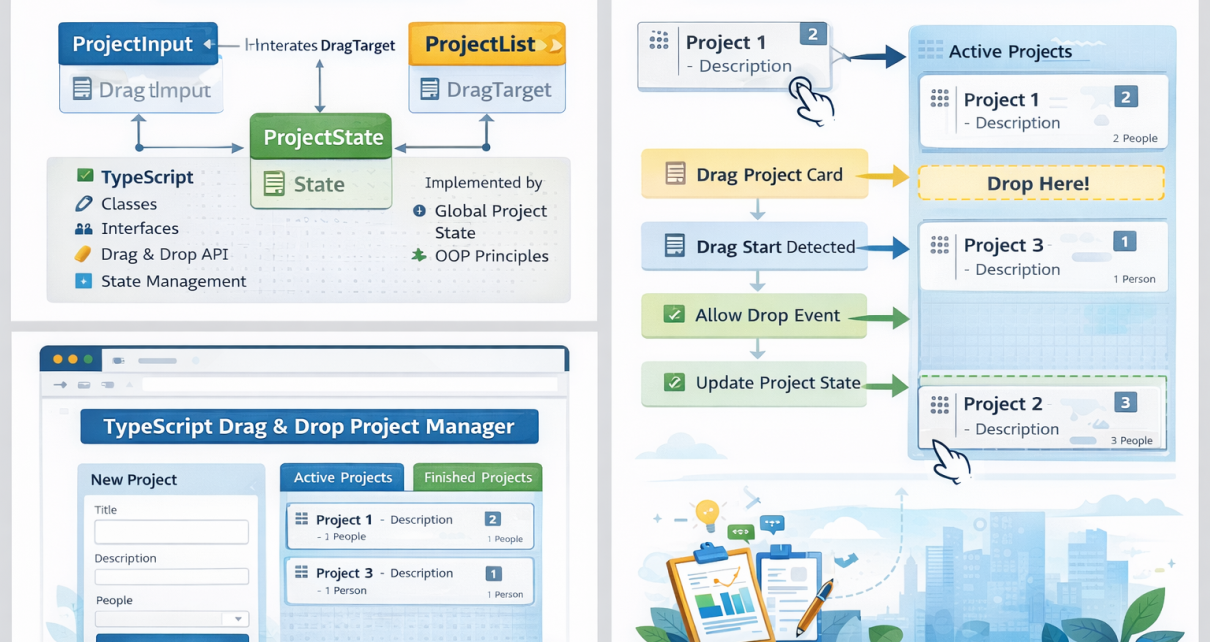
Modern web applications often require interactive user interfaces that allow users to manipulate elements visually. One of the most common examples is a drag-and-drop task manager, similar to a Kanban board used in tools like Trello or Jira.
In this project, the repository 3-ts-dragndrop-app demonstrates how to build a TypeScript-powered drag-and-drop project management application using modular architecture and object-oriented programming.
🔗 GitHub Repository:
https://github.com/sf-co/3-ts-dragndrop-app
The application allows users to create projects and move them between different states such as Active and Finished using drag-and-drop interactions.
🚀 Project Overview
This project implements a simple project management UI where users can:
- Add new projects
- View active projects
- Move projects to finished state
- Drag projects between lists
The entire architecture is built using TypeScript classes and modules, making the codebase clean, maintainable, and scalable.
The application initializes three main components:
import { ProjectInput } from './components/project-input.js';
import { ProjectList } from './components/project-list.js';new ProjectInput();
new ProjectList('active');
new ProjectList('finished');
These components form the core structure of the application.
🧱 Architecture of the Application
The application follows a component-based structure, separating responsibilities across different modules.
1️⃣ ProjectInput Component
The ProjectInput component handles:
- User input
- Form validation
- Creating new projects
Users can enter information such as:
- Project title
- Description
- Number of people assigned
After submission, the project is added to the global project state.
2️⃣ ProjectList Component
Two instances of ProjectList are created:
new ProjectList('active');
new ProjectList('finished');
These represent two Kanban-style columns:
| Column | Description |
|---|---|
| Active | Projects currently in progress |
| Finished | Completed projects |
Projects can be dragged from Active to Finished and vice versa.
🖱 Drag and Drop Functionality
The app uses native HTML5 drag-and-drop APIs combined with TypeScript logic.
Typical drag-and-drop flow:
1️⃣ Drag project card
2️⃣ Detect drag start
3️⃣ Allow drop on target list
4️⃣ Update project state
Example conceptual flow:
Drag Project
      ↓
Active List
      ↓
Drop Event
      ↓
Move Project State
      ↓
Finished List
This interaction makes the UI dynamic and intuitive.
📂 Key Concepts Demonstrated
This project is a great learning resource because it demonstrates several important TypeScript concepts.
TypeScript Interfaces
Used to define project data structures.
Classes & OOP
Each component is implemented using classes.
State Management
A centralized state manages project updates.
DOM Manipulation
Elements are dynamically rendered in the UI.
Drag-and-Drop APIs
Native browser drag events power the interaction.
📊 Application Workflow
Here is the high-level workflow of the application:
User Creates Project
        ↓
ProjectInput Validates Data
        ↓
Project Stored in Global State
        ↓
ProjectList Renders Item
        ↓
User Drags Project
        ↓
Project State Updates
        ↓
UI Automatically Re-renders
🛠 Technologies Used
- TypeScript
- HTML5 Drag & Drop API
- Object-Oriented Programming
- Modular JavaScript
- DOM Manipulation
💡 Why This Project Is Useful
This repository is an excellent learning project for frontend developers because it demonstrates:
- Clean TypeScript architecture
- Component-based development
- Practical drag-and-drop UI
- State management patterns
Developers learning TypeScript + frontend architecture will benefit greatly from studying and modifying this project.
📦 How to Run the Project
Clone the repository:
git clone https://github.com/sf-co/3-ts-dragndrop-app.git
Navigate to the project folder:
cd 3-ts-dragndrop-app
Compile TypeScript:
tsc
Open index.html in your browser.
🎯 Final Thoughts
The 3-ts-dragndrop-app project is a great demonstration of how TypeScript can be used to build structured, interactive web applications.
By combining modular components, state management, and drag-and-drop functionality, this project creates a simple yet powerful project management tool. It’s an excellent starting point for developers who want to explore TypeScript-driven UI architecture and build more advanced interactive applications.