Managing school supply distribution may seem simple at first glance, but when scaled across multiple schools, classrooms, and students, the process becomes a complex operational challenge. From inventory tracking to request approvals and supply distribution, several steps must be coordinated efficiently.
To demonstrate how technology and project management practices can solve such challenges, the “3 PM School Supplies Application – End-to-End Project Management Implementation” GitHub project provides a practical example of how a complete software system can be built while following structured development and collaboration workflows.
In this blog, we will explore how the project works, the technologies involved, and the step-by-step workflow used to implement it.
Project Overview
The 3 PM School Supplies Application is designed to simulate a real-world project where teams develop an application that helps manage and track school supplies distribution.
The goal of the system is to:
- Track supply requests from students or classrooms
- Manage inventory of school supplies
- Organize supply distribution workflows
- Provide visibility into supply allocation and availability
The project demonstrates not only application development but also complete project management implementation, including planning, task tracking, version control, and collaborative development practices.
Software engineering projects often require structured processes such as issue tracking, pull requests, testing, and documentation to ensure successful delivery and collaboration among team members.
Technologies Used in the Project
The project integrates several technologies and development tools to simulate a real production workflow.
1. Version Control – Git & GitHub
GitHub serves as the central collaboration platform where developers manage code, track issues, and handle project planning.
Key features used:
- Git version control
- Pull requests
- Branching strategy
- Commit history tracking
Version control systems help maintain a clear development history and enable teams to collaborate effectively.
2. Project Management – GitHub Projects
The repository uses GitHub Projects to organize tasks and track progress.
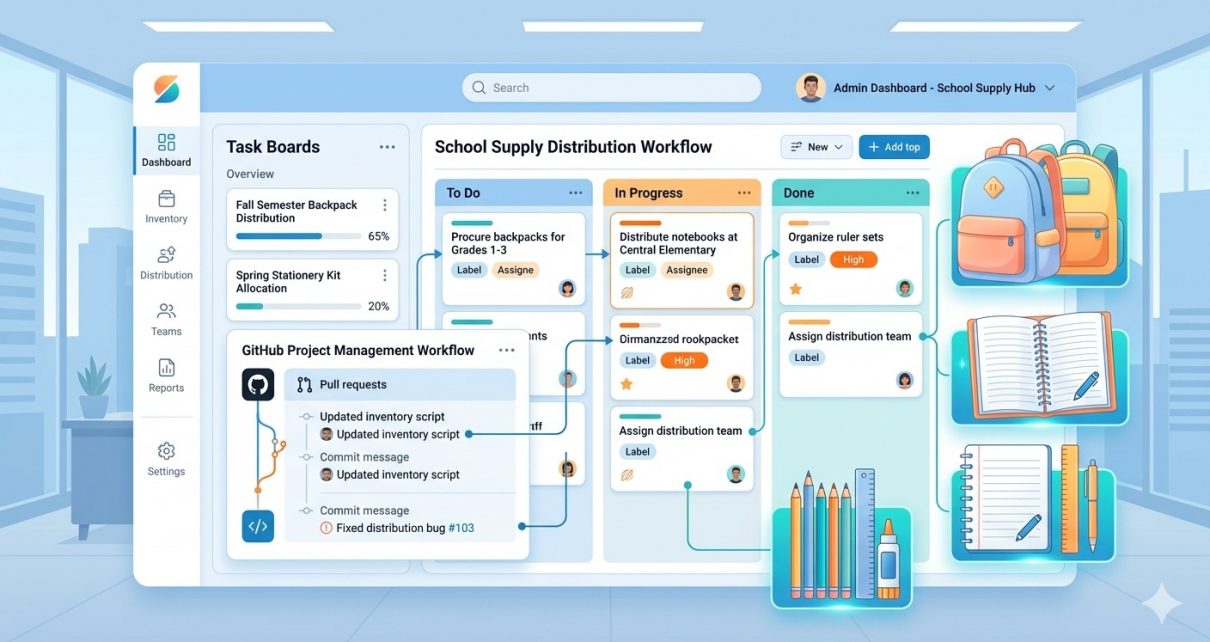
Typical workflow board:
- To Do – Tasks waiting to start
- In Progress – Active development tasks
- Review – Code review stage
- Done – Completed tasks
This Kanban-style workflow helps teams visualize progress and manage responsibilities efficiently.
3. Issue Tracking
GitHub Issues are used to:
- Track bugs
- Define new features
- Assign tasks to team members
- Document discussions
Each issue represents a specific development task.
4. Pull Request Workflow
Developers create pull requests when submitting new code changes.
Pull requests allow:
- Code reviews
- Team feedback
- Quality checks before merging code into the main branch.
5. Testing and Documentation
The project includes documentation and testing processes to ensure reliability.
Key elements include:
- Feature documentation
- User interaction instructions
- Testing strategies
Documentation ensures that other developers or users can easily understand how to interact with the system.
Step-by-Step Guide: How to Use the Project
Below is a simplified guide to running and exploring the project.
Step 1 – Clone the Repository
First, download the project locally.
git clone https://github.com/sf-co/3-pm-school-supplies-application-end-to-end-project-management-implementation.git
Navigate to the project folder:
cd 3-pm-school-supplies-application-end-to-end-project-management-implementation
Step 2 – Install Dependencies
Install all required packages.
Example:
npm install
This will install the necessary libraries required to run the application.
Step 3 – Configure Environment
Some applications require environment configuration such as database settings or API keys.
Example:
.env
Add required configuration values if needed.
Step 4 – Run the Application
Start the application locally.
Example command:
npm start
The application should now be running locally.
Step 5 – Explore the Features
Once the application is running, you can test features such as:
- Creating supply requests
- Managing inventory
- Assigning supplies to students
- Tracking request status
These features demonstrate how the application manages the entire workflow of school supply distribution.
Development Workflow Used in the Project
The project follows a structured development lifecycle similar to modern software teams.
Planning Phase
During planning, the team defines:
- Project goals
- Feature requirements
- User stories
- Task breakdown
Task Assignment
Each task is assigned to developers using GitHub Issues.
Example roles may include:
- Frontend Developer
- Backend Developer
- QA Tester
- Project Manager
Development Phase
Developers create feature branches and implement functionality.
Example workflow:
main
 ├── feature/inventory-management
 ├── feature/request-system
 └── bugfix/request-validation
Code Review Phase
All changes are submitted through pull requests where team members review the code before merging.
This ensures:
- Code quality
- Security
- Consistency across the project.
Testing and Deployment
After approval, the code is merged into the main branch and tested before deployment.
Why This Project Is Valuable
This project is particularly useful for developers who want to learn:
- Real-world software project workflows
- GitHub project management
- Collaborative development practices
- End-to-end application lifecycle
Instead of focusing only on coding, it highlights the importance of planning, collaboration, and structured development processes, which are essential in modern software teams.
Conclusion
The 3 PM School Supplies Application project demonstrates how software development and project management can work together to deliver real solutions.
By combining GitHub workflows, issue tracking, collaborative development, and testing strategies, the project simulates how professional engineering teams build scalable applications.
For students, developers, or project managers, exploring this repository provides valuable insight into how an idea evolves into a fully managed software project.
If you’re looking to understand end-to-end project implementation, this repository offers a great starting point.