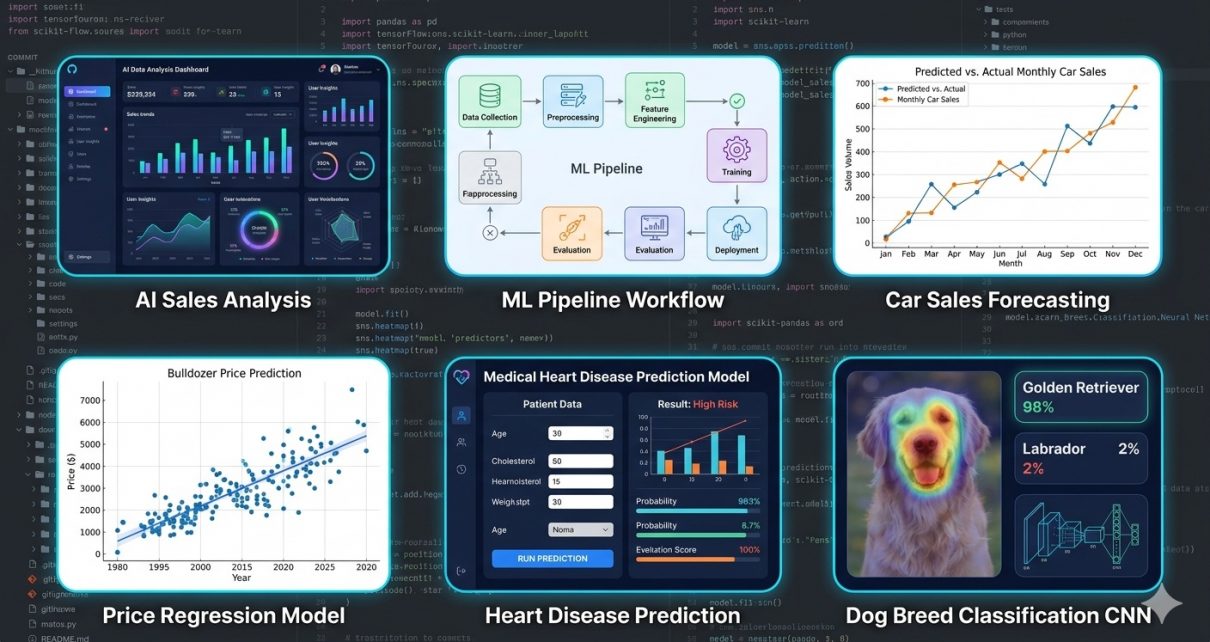
Modern machine learning covers multiple domains — from tabular regression and classification to deep learning for images. But assembling end‑to‑end workflows that span these domains can be daunting, especially for newcomers. That’s where the AI Analytics & Predictive Modeling Suite shines: it is a single GitHub repository bundling together four complete, real‑world predictive analytics applications built in Python. Whether you’re exploring automotive prediction, healthcare risk modeling, construction price analysis, or computer vision classification, this suite gives you practical pipelines you can learn from, customize, and extend.
In this post, we’ll explore what this suite contains, the technologies behind it, and how you can clone and run the project step by step.
What’s Inside the Suite?
The suite contains four end‑to‑end AI/ML demo applications:
- Synthetic Car Sales Dataset Generator – simulates realistic car sales data.
- Bluebook Bulldozer Price Prediction – regression modeling to estimate resale value.
- Heart Disease Classification – predicts the likelihood of heart disease from medical features.
- Dog Vision Classification – a deep learning computer vision model for dog breed identification.
These represent a diverse set of machine learning problem types:
- Regression for numeric prediction (bulldozer prices),
- Binary classification (heart disease),
- Dataset generation and exploration,
- Convolutional neural network (CNN) based image classification (dog breeds).
This variety makes it a useful educational tool for data scientists and ML engineers who want to see how different predictive modeling techniques fit together in real practice.
Technologies & Workflow Highlights
Core Technologies Used
Here’s a snapshot of the principal technologies and libraries incorporated:
- Python — core language orchestrating all workflows.
- Pandas & NumPy — data manipulation and numerical computing.
- Matplotlib & Seaborn — for exploratory visualizations.
- Scikit‑Learn — classic ML: Random Forests, Logistic Regression, KNN, encoders, and model tuning.
- TensorFlow / Keras — deep learning and transfer learning (for dog image classification).
- RandomizedSearchCV — advanced hyperparameter tuning for model optimization.
- GPU‑accelerated Training — optional for image classification (especially on platforms like Colab).
General Workflow Across Examples
Although each model targets a specific problem, the overall workflow is typical of many predictive analytics projects:
- Data Loading & Exploration – load datasets and inspect distributions, missing values, and feature types.
- Feature Engineering – prepare data using encoding, scaling, and transformations; an important step for quality predictions.
- Model Selection – choose algorithms appropriate for the problem (classification vs. regression).
- Training & Evaluation – fit models and evaluate performance metrics.
- Hyperparameter Tuning – use search strategies like RandomizedSearchCV to optimize models.
- Deployment / Export – save models and results, or generate outputs like plots and reports.
This structure reflects best practices common in predictive analytics workflows across industries.
Step‑by‑Step Guide: How to Use the Suite
Here’s how you can get started with this project:
1. Clone the Repository
Open a terminal and run:
git clone https://github.com/sf-co/17-ai-analytics-predictive-modeling-suite.git
cd 17-ai-analytics-predictive-modeling-suite
2. Set Up Your Environment
Create and activate a Python virtual environment:
python3 -m venv venv
source venv/bin/activate   # MacOS/Linux
venv\Scripts\activate      # Windows
Install dependencies:
pip install -r requirements.txt
(If there’s no requirements.txt, manually install pandas numpy scikit-learn tensorflow matplotlib seaborn.)
3. Explore the Data Folder
Inside the project, you’ll see a dataset structure with data and car-sales-data-manufacture. Before running models, take a look at raw data:
import pandas as pddf = pd.read_csv('data/your_dataset.csv')
print(df.head())
Use visualizations to inspect distributions and spot missing values:
import seaborn as sns
sns.histplot(df['feature_name'])
4. Train & Evaluate Models
There are Jupyter notebook workflows or Python files for each use case:
- Regression Demo – Run the bulldozer price predictor script/notebook.
- Classification Model – Open and run the heart disease classifier.
- Deep Learning Image Model – Launch the Dog Vision notebook (best with GPU support).
Each notebook typically includes:
- Data preprocessing
- Model training
- Performance visualization
5. Tuning Hyperparameters
Look for blocks where RandomizedSearchCV is used. These parts iteratively test parameters to find the best model performance. Adjust parameter ranges as needed for your dataset.
6. Export Results (Optional)
Depending on the notebook, models may be saved to disk or exported in formats like CSV and Parquet for reporting or further use:
df.to_parquet('processed_data.parquet')
Why This Repository Matters
In the world of predictive analytics, mastering the full pipeline — from raw data to deployable model — is a key skill. This suite provides clean, educational examples across several problem types. Whether you’re a student learning machine learning, an analyst who wants to expand into AI, or a developer building multi‑domain ML tooling, this repo is a practical resource.
Predictive modeling itself — the backbone of this suite — is used across business, healthcare, automotive, and many other fields to drive data‑informed decisions and forecasts.
Conclusion
The AI Analytics & Predictive Modeling Suite brings together multiple complete AI workflows under one roof and is a great toolkit for anyone looking to understand how diverse machine learning models are built and evaluated in practice. From regression and classification to the latest deep learning techniques, this repository can accelerate your learning and serve as a foundation for your own data science projects.
Feel free to fork the repo, experiment with different models, swap datasets, and integrate new features like model deployment or automation using CI/CD.