Generative AI is transforming how we create content online — from marketing visuals to intelligent text summarization. But most developers hit the same hurdle: the complexity of deploying a reliable API for AI image creation. That’s where the 15‑ai‑image‑generation‑api project comes in. This open‑source repository (hosted on GitHub) offers a serverless solution built with AWS Cloud Development Kit (CDK) that exposes AI‑powered endpoints for both AI image generation and text summarization — all deployed with scalable AWS services.
In this post, we’ll walk through the project’s architecture, the key technologies involved, and step‑by‑step instructions to get it running on your own AWS account.
What Is 15‑ai‑image‑generation‑api?
At its core, 15‑ai‑image‑generation‑api is a serverless backend built with Python and AWS CDK that:
- Provides a REST API for generating images from text prompts.
- Offers an intelligent text summarization endpoint.
- Uses AWS Lambda functions for backend logic.
- Integrates with Amazon Bedrock models — including image generators like Titan Image Generator and text models like amazon.titan‑text‑express‑v1 through the Bedrock runtime.
- Stores generated images in Amazon S3 and returns secure, temporary pre‑signed URLs so clients can fetch images safely.
This means you get a cloud‑hosted API that scales automatically without managing servers.
Why This Project Matters
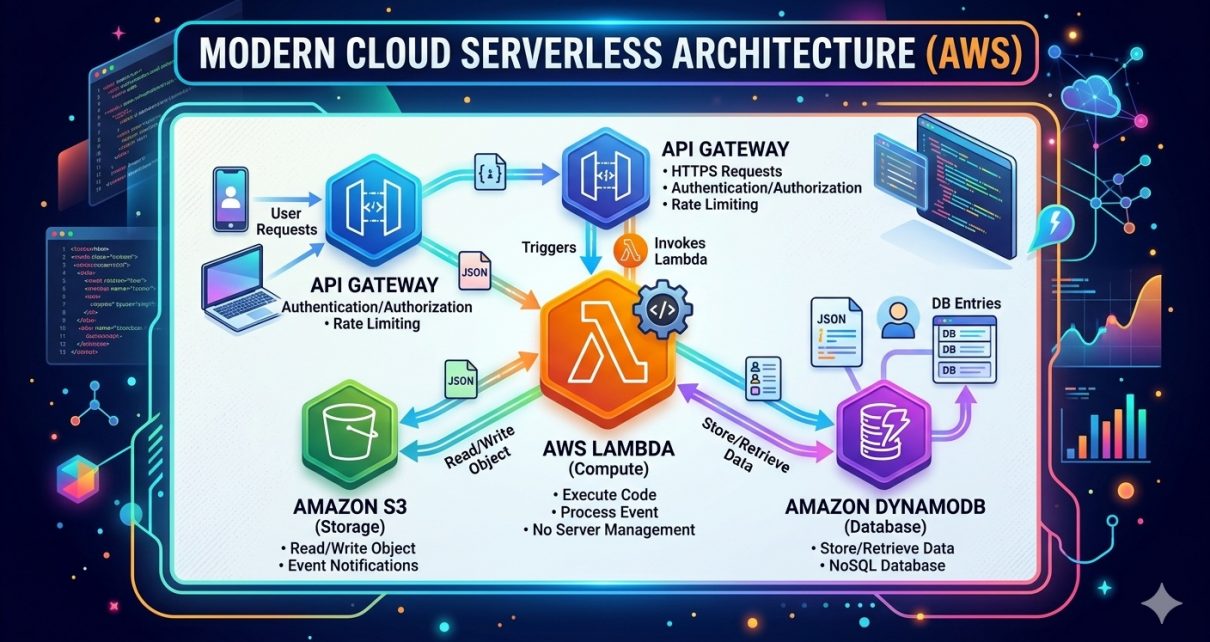
Rather than manually configuring VMs, Docker, or scaling Kubernetes clusters, this repository lets you quickly spin up an intelligent backend using:
- AWS CDK — Infrastructure as code for repeatable deployments.
- Lambda Functions — Serverless compute for endpoints.
- API Gateway — Routed endpoints for
/imageand/text. - S3 — Storage for generated media.
This architecture is ideal for creators building AI‑powered SaaS apps, marketing dashboards, design tools, or even mobile apps requiring automated image generation.
Project Workflow & Technology Stack
Understanding how the pieces fit together helps you customize the API:
- API Request
A client sends a request to API Gateway with a text prompt. - Lambda Function Triggered
API Gateway invokes a Lambda which:- Checks input.
- Calls Amazon Bedrock model (for image or text).
- Produces a result.
- Image Generation
If it’s an image request:- The function requests the Titan Image Generator (or another Bedrock model) to generate the image from the prompt.
- Once generated, the image is uploaded to S3.
- A pre‑signed URL is returned to the client.
- Text Summarization
For text requests:- The function builds a structured prompt.
- Invokes a summarization Bedrock model (example:
amazon.titan‑text‑express‑v1). - Returns the summary as JSON.
Key Technologies Used:
- 🧠 AWS Bedrock Models for generation intelligence.
- 💻 Python 3.11 for Lambda runtime.
- 📦 AWS CDK for infrastructure provisioning.
- ☁️ Amazon API Gateway & Lambda for serverless API endpoints.
- 📁 Amazon S3 for storing and retrieving images.
Together, they provide a scalable, pay‑as‑you‑go backend that handles both compute and storage without server management.
Step‑by‑Step: Deploying the Project
Here’s a simple practical guide to getting this running yourself.
1. Clone the Repository
git clone https://github.com/sf-co/15-ai-image-generation-api.git
cd 15-ai-image-generation-api
2. Install Dependencies
Create and activate a Python virtual environment:
python -m venv venv
source venv/bin/activate
pip install -r requirements.txt
This pulls in the libraries needed for AWS CDK and model invocation.
3. Configure AWS CLI
Make sure the AWS CLI is installed and configured with credentials that can deploy CDK stacks:
aws configure
Provide your Access Key, Secret Key, Region, and default output format.
4. Bootstrap and Deploy CDK
AWS CDK needs to bootstrap your account:
cdk bootstrap
Now deploy the entire stack:
cdk deploy
During deployment, the stack will create:
- API Gateway resources.
- Two Lambda functions.
- S3 bucket for storing generated output.
5. Test the API
Once deployed, CDK outputs the API endpoint URLs. Try them with curl or Postman:
Image Generation
curl -X POST https://<your-api-id>.execute-api.<region>.amazonaws.com/image \
  -H "Content-Type: application/json" \
  -d '{"prompt": "A futuristic city skyline at sunset"}'
You should receive a JSON response with a pre‑signed S3 URL to your generated image.
6. Text Summarization
curl -X POST https://<your-api-id>.execute-api.<region>.amazonaws.com/text \
  -H "Content-Type: application/json" \
  -d '{"text": "Long article to summarize goes here"}'
This returns a structured summary JSON.
Tips for Better Results
- Prompt Crafting: Golden rule in image AI — the more descriptive the prompt, the better the result. Include style, lighting, or mood cues.
- Security: Replace open endpoints with API keys or authorizers.
- Model Choices: Experiment with different Bedrock models or weights for quality vs cost efficiency.
- Storage Cleanup: Setup lifecycle rules on S3 to automatically manage old images.