Modern software development requires fast, reliable, and automated deployment pipelines. Traditional deployment methods are slow, error-prone, and difficult to scale. This is why DevOps practices combined with containerization and Kubernetes orchestration have become the industry standard.
In this project, we build a DevOps Account Microservice and implement a full CI/CD pipeline that automatically builds, tests, and deploys the application into Kubernetes.
The project demonstrates real-world DevOps workflows including:
- Microservices architecture
- Containerization using Docker
- Continuous Integration
- Continuous Deployment
- Kubernetes-based orchestration
Automating build and deployment pipelines helps teams deliver features faster while maintaining reliability and stability. CI/CD pipelines automate integration, testing, and deployment processes to reduce manual work and minimize errors.
This article walks through the architecture, technologies used, workflow, and how you can run this project yourself.
GitHub Repository:
https://github.com/sf-co/1-devops-account-microservice-ci-cd-kubernetes
Project Overview
The DevOps Account Microservice is a backend service that demonstrates how a microservice can be automatically built, containerized, and deployed into a Kubernetes cluster using a CI/CD pipeline.
The key idea behind the project is to simulate a real DevOps workflow where:
- Developers push code to GitHub
- CI pipeline builds and tests the application
- Docker image is created
- Image is pushed to a container registry
- Kubernetes automatically deploys the new version
This creates a fully automated deployment lifecycle.
Technologies Used
This project uses several modern DevOps tools and cloud-native technologies.
1. GitHub
GitHub is used as the source code repository and triggers the CI/CD pipeline whenever new changes are pushed.
2. Docker
Docker is used to containerize the microservice, ensuring that the application runs consistently across different environments.
3. CI/CD Pipeline
The CI/CD pipeline automates the build and deployment process. Typical pipeline stages include:
- Code checkout
- Dependency installation
- Application build
- Docker image creation
- Image push to registry
- Kubernetes deployment
4. Kubernetes
Kubernetes orchestrates containerized applications and manages scaling, networking, and deployment.
5. YAML Infrastructure Configuration
Deployment configuration files define how the application should run inside Kubernetes.
Project Architecture
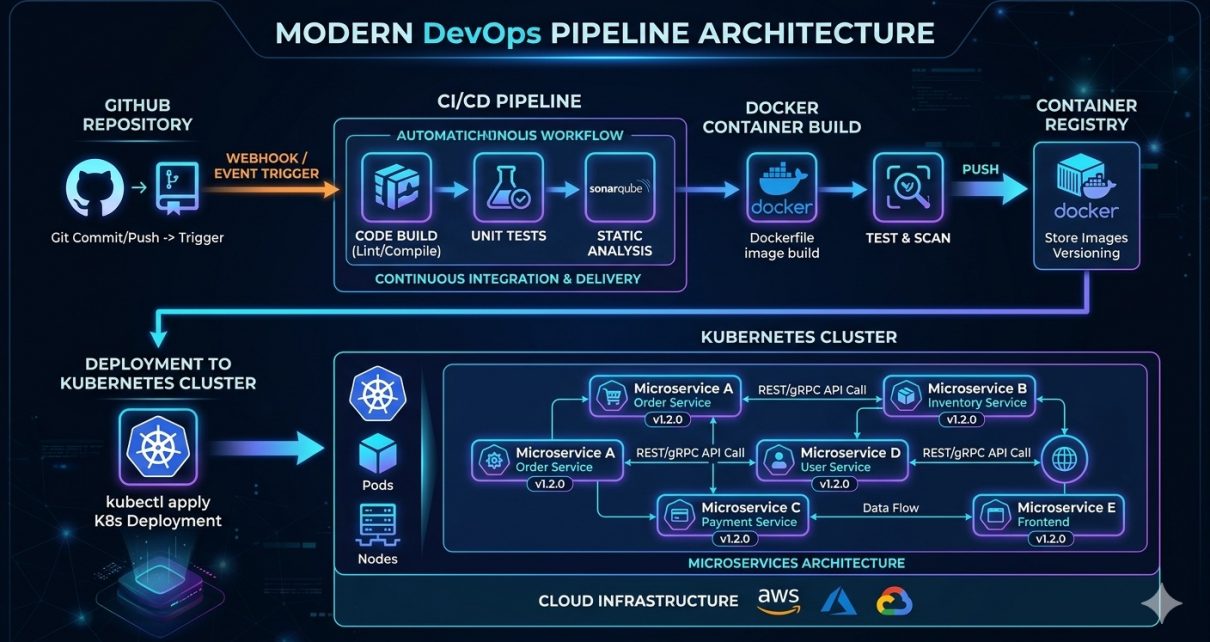
The architecture of the project follows a simple DevOps workflow:
Developer Push
      │
      ▼
   GitHub Repo
      │
      ▼
  CI/CD Pipeline
      │
      ▼
  Docker Image Build
      │
      ▼
Container Registry
      │
      ▼
Kubernetes Deployment
      │
      ▼
Running Microservice
Each component in the pipeline ensures that the application moves smoothly from development to production.
CI/CD Workflow Explained
The automated pipeline works as follows:
Step 1: Code Commit
A developer pushes new code to the GitHub repository.
This triggers the CI/CD pipeline automatically.
Step 2: Continuous Integration
The CI stage performs:
- Source code checkout
- Dependency installation
- Build process
- Basic validation
This ensures that new code integrates correctly with the existing codebase.
Step 3: Docker Image Build
The pipeline builds a Docker image using the project’s Dockerfile.
Example command:
docker build -t account-microservice .
The container image packages the application and all required dependencies.
Step 4: Push Image to Registry
Once built, the image is pushed to a container registry.
Example:
docker push account-microservice:latest
This image will later be pulled by Kubernetes.
Step 5: Kubernetes Deployment
The Kubernetes manifests define:
- Deployment
- Service
- Container configuration
The cluster pulls the latest image and deploys the updated version.
How to Run the Project (Step-by-Step)
Follow these steps to use the project locally.
Step 1: Clone the Repository
git clone https://github.com/sf-co/1-devops-account-microservice-ci-cd-kubernetes.git
cd 1-devops-account-microservice-ci-cd-kubernetes
Step 2: Install Prerequisites
Make sure the following tools are installed:
- Docker
- Kubernetes (Minikube or Kind)
- kubectl
- Git
Step 3: Build Docker Image
Build the application container.
docker build -t account-microservice .
Step 4: Start Kubernetes Cluster
If you are using Minikube:
minikube start
Step 5: Deploy to Kubernetes
Apply Kubernetes configuration files.
kubectl apply -f k8s/
Step 6: Verify Deployment
Check running pods.
kubectl get pods
Check services.
kubectl get services
Once the service is running, you can access the microservice through the exposed endpoint.
Why This Project Matters
This project demonstrates real-world DevOps practices used by modern engineering teams.
Key skills showcased include:
- Microservice deployment
- Containerization
- CI/CD automation
- Kubernetes orchestration
- Infrastructure as Code
These are essential skills for roles such as:
- DevOps Engineer
- Cloud Engineer
- Site Reliability Engineer
- Platform Engineer
Possible Improvements
To make the project more production-ready, you could extend it by adding:
- Helm charts
- Monitoring with Prometheus
- Logging with ELK stack
- GitOps using ArgoCD
- Security scanning
Conclusion
This DevOps microservice project provides a practical demonstration of how modern applications are built and deployed using CI/CD pipelines and Kubernetes orchestration.
By integrating automation into the development lifecycle, teams can release software faster, reduce errors, and maintain scalable infrastructure.
If you are learning DevOps, building projects like this is one of the best ways to understand real-world deployment workflows.
Explore the project here:
https://github.com/sf-co/1-devops-account-microservice-ci-cd-kubernetes